
table of contents
Find a Free ATS Resume Optimizer That Does More Than Give You a Score
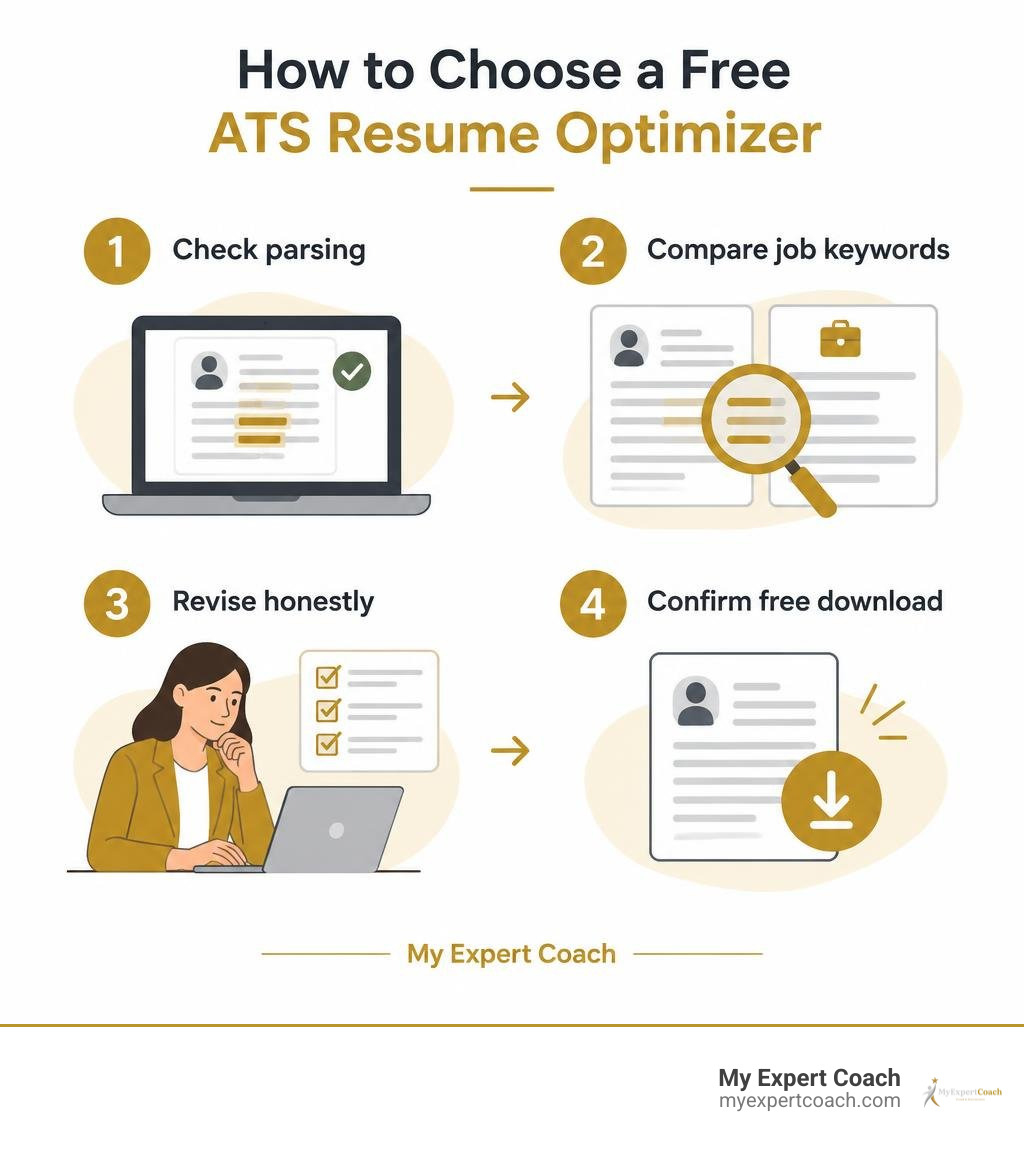
Free ATS resume tools do exist. To find one worth using, check what you can do before you create an account or pay: upload your resume, compare it with a job posting, see missing terms, and inspect the text the tool extracts. Then confirm you can download your revised resume for free. Some tools offer a free check but charge for rewriting or downloads.
For an executive resume, treat the score as a guide, not a verdict. Fix any missing or scrambled text first. Then add relevant terms only where they reflect work you have actually done, backed by clear results.
I’m Sandy Spencer, a career coach with more than 38 years of experience in HR and executive recruiting. I’ve helped advance over 10,000 careers, and I’ll help you look past the promise behind “ats resume optimizer free” to find a tool that supports a strong, honest resume.
Over 97% of Fortune 500 companies screen resumes using an Applicant Tracking System (ATS) before any human recruiter reads them. Across the wider corporate landscape, almost 85% of employers rely on automated systems to manage candidate pipelines. Workday alone screens roughly 30% of all large-company job applications.
Yet these systems create friction for employers and candidates alike. A study by Harvard Business Review revealed that 88% of employers believe qualified candidates are filtered out by ATS platforms simply because their documents lack matching phrasing or contain parsing errors. Relying on an effective, accessible tool helps level the playing field so your accomplishments reach hiring decision-makers.
ATS Resume Checkers, Scanners, and Optimizers: What Is the Difference?
Job seekers often encounter three terms used interchangeably: checkers, scanners, and optimizers. While they serve related purposes, their technical functions differ significantly:
- ATS Resume Checker: Evaluates file health, formatting rules, font compatibility, and standard headings. It flags elements that could disrupt a parser, such as tables or complex layouts.
- ATS Resume Scanner: Compares your resume against a target job description, calculating a match score based on keyword frequency and semantic alignment.
- ATS Resume Optimizer: Combines structural parsing checks with job-specific keyword analysis. It highlights exact competency gaps and suggests context-appropriate revisions for your bullet points.
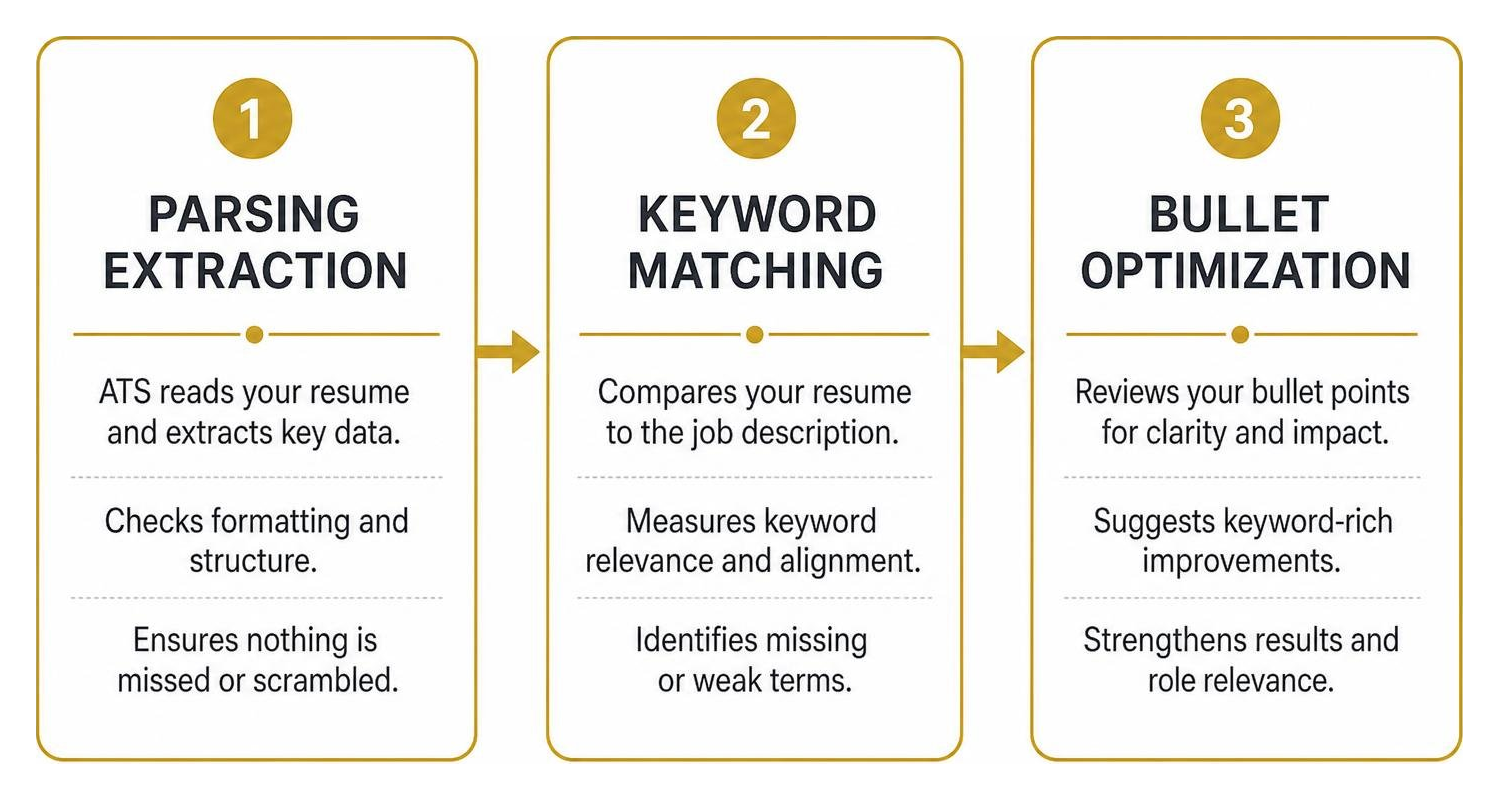
Modern ATS platforms rely on parsing engines like Sovren and Textkernel to deconstruct documents into raw data fields—such as work history, job titles, hard skills, and degrees. An optimizer tests how these engines process your career history, ensuring nothing is lost in translation.
While a traditional resume builder creates a layout from scratch, an optimizer refines your existing background to match the specific nuances of an open role. For senior leaders navigating complex transitions, pairing these tools with comprehensive career consulting services ensures your messaging appeals to both screening algorithms and human executive search panels.
To see what a system reads without spending money, test your file with a free ATS resume checker to verify raw text extraction.
Key Capabilities to Look for in an ATS Resume Optimizer Free Tool
Not every free platform provides actionable insights. Many deliver vague scores designed to push you into paid subscriptions. When testing an ats resume optimizer free solution, look for clear diagnostic feedback rather than arbitrary numbers.
| Feature Category | Free ATS Checkers | Free ATS Optimizers | Premium Career Platforms |
|---|---|---|---|
| Parsing Diagnosis | Basic format validation | Line-by-line raw text extraction | Full multi-engine simulation |
| Keyword Gap Report | Basic frequency counts | Detailed missing core competencies | Semantic role-specific weighting |
| Content Rewriting | None | Limited AI bullet suggestions | Comprehensive human & AI editing |
| Job Description Match | General alignment score | Side-by-side percentage match | Multi-role tracking & custom metrics |
| Download Options | Summary report only | Clean plain text or DOCX export | Multi-format executive templates |
Core Capabilities of an ATS Resume Optimizer Free Tier
An effective free tier should offer:
- Line-by-line raw text extraction: The ability to see exactly what the parser reads, confirming no titles, dates, or metrics disappear.
- Keyword gap analysis: A clear breakdown showing required hard skills, tools, and certifications present in the job posting but missing from your document.
- File compatibility: Support for both .docx and text-layer .pdf formats to confirm compatibility with standard recruitment portals.
- Contextual match scoring: Match scores calculated against specific job descriptions rather than generic industry averages.
For an AI-driven perspective on tailoring your documents to specific postings, you can explore the AI Resume Optimizer for Any Job to see how modern platforms align candidate data with hiring requisitions.
Limitations of Free Tools vs. Paid Tiers
Free software tiers provide useful initial checks, but they come with practical trade-offs:
- Usage limits: Daily scanning caps or limited AI rewrite credits.
- Generic suggestions: AI-generated bullets that may sound robotic or use overused corporate buzzwords.
- Paywalled downloads: Some platforms let you analyze your document for free but require payment to export the edited file.
- Lack of nuance: Software cannot assess executive leadership scope, boardroom influence, or cultural alignment.
Eliminating Parsing Errors: Layout and Formatting Best Practices
Formatting errors cause many automated rejections. When an ATS cannot parse your layout, it indexes scrambled text, leading to an artificially low match score.

Avoid these common formatting pitfalls:
- Multi-column layouts: Parsers read left-to-right across the entire page, merging columns together and scrambling dates, titles, and company names.
- Tables and text boxes: Parsing engines often skip content placed inside floating text containers or table cells entirely.
- Header and footer data: Vital contact details placed in document headers or footers are frequently ignored by older parsing software.
- Unconventional headings: Using creative labels like “Where I’ve Been” instead of standard headers like “Professional Experience” prevents systems from categorizing your history correctly.
- Non-standard fonts: Stick to clean, universal typefaces like Calibri, Arial, Georgia, or Garamond.
Applying executive resume tips for 2026 helps ensure your layout remains visually appealing to human decision-makers while remaining fully readable for automated parsers.
How to Conduct Keyword Gap Analysis and Bullet Rewriting
Applicant tracking systems rely on natural language processing (NLP) to index candidate profiles. When a recruiter searches their database for specific competencies, the system ranks profiles that contain those terms within relevant context.
Rather than scattering keywords randomly, incorporate role-specific language directly into your bullet points alongside quantifiable achievements. Using results-oriented keywords helps frame your background around measurable business outcomes.
Integrating targeted terminology into an overarching plan strengthens your broader job search strategies, keeping your materials aligned across platforms.
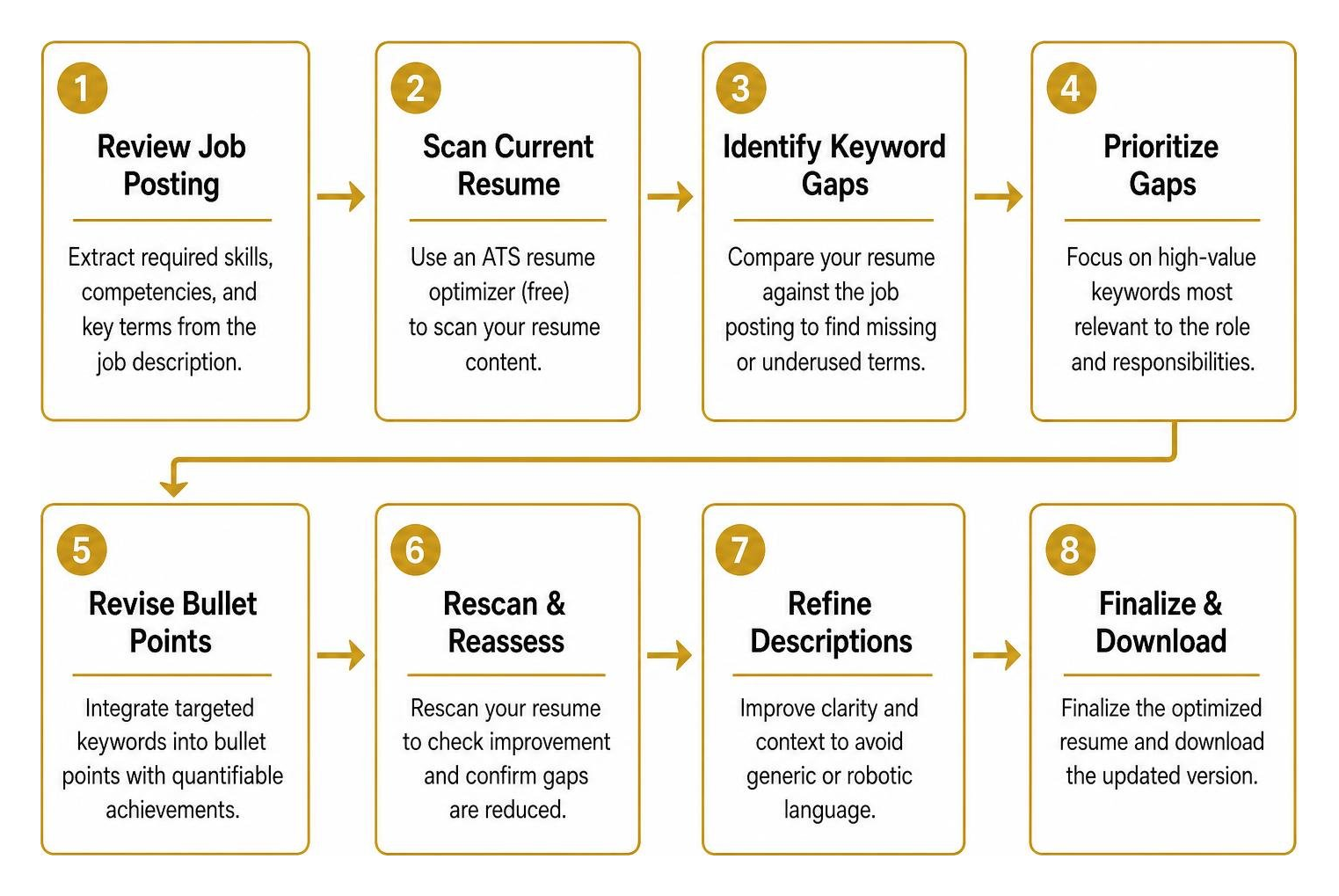
Step-by-Step Workflow: Using an ATS Resume Optimizer Free Solution
Follow this structured workflow to optimize your resume:
- Extract Job Description Terms: Copy the target posting into the optimizer to identify top hard skills, tools, and core qualifications.
- Review the Raw Text Extraction: Upload your resume to confirm that job titles, employment dates, and bullet points appear in logical order.
- Analyze Competency Gaps: Compare the generated keyword list against your career history, noting where you have relevant experience that isn’t explicitly stated.
- Rewrite Bullet Points: Revise your bullets using an active formula: Action Verb + Context/Skill + Quantifiable Business Result.
- Re-evaluate Match Alignment: Run your revised draft through the optimizer to verify that your match score improves naturally without disrupting readability.
- Export and Proofread: Save the final document in clean DOCX or plain PDF format, conducting a final manual review for tone and clarity.
Avoiding Keyword Stuffing and Generic AI Phrasing
While incorporating necessary keywords is important, over-optimizing can backfire once your document reaches human recruiters.
- Never use “white fonting”: Hiding invisible keywords in white text is an outdated tactic. Modern parsers extract all text into plain strings, exposing hidden lists immediately.
- Avoid automated jargon: Do not let automated tools replace your voice with generic buzzwords like “synergized,” “leveraged,” or “dynamic go-getter.”
- Verify metrics: Automated writing tools sometimes invent or exaggerate data. Ensure every percentage, revenue figure, and team size accurately reflects your career history.
- Write for human readers first: The algorithm determines whether your resume gets surfaced, but a hiring manager decides whether you get interviewed.
Frequently Asked Questions About ATS Optimization
How do free ATS resume tools handle candidate data privacy?
Trustworthy tools maintain clear privacy policies that outline data retention schedules. Look for platforms that delete uploaded files after your session and explicitly state they do not sell user data or share candidate profiles with third parties. Avoid tools that require unnecessary personal details before running a basic parsing check.
Will applicant tracking systems automatically reject AI-generated content?
Standard ATS platforms filter resumes based on keyword relevance and layout readability rather than AI detection scores. However, recruiters can readily identify generic, AI-generated phrasing. Using automated suggestions as a starting point and refining them in your own voice ensures your resume remains engaging and authentic.
Should resumes be submitted as DOCX or PDF files?
A standard .docx file remains the most universally compatible format across legacy and modern parsing engines. Text-based .pdf files work well with modern systems like Greenhouse, Lever, and Workday, provided they contain a selectable text layer and avoid flattened image elements.
Conclusion
Automated screening tools are a standard part of corporate hiring, but they do not have to stand between you and your next career move. Using a free ATS optimizer gives you clear visibility into how parsing engines process your background, helping you resolve formatting errors and address keyword gaps before applying.
While software provides valuable diagnostics, long-term career growth requires a strategic narrative. We help senior leaders craft compelling career materials that pass automated filters and resonate with boardrooms and executive search teams. Pair technical precision with expert guidance through our professional resume and LinkedIn optimization services to ensure your executive value stands out at every stage of the hiring process.

[…] lacks industry-standard terms, it may never reach human eyes. Evaluating your materials through an ats resume optimizer free tool can confirm your credentials parse […]